Your store, in your warehouse.
Syncify extracts your Shopify data — 16 entity types, from products and orders to customers and inventory — and loads it into your own database, warehouse or drive on a schedule you set. Pick the fields, pick the cadence, and let it run.
load · inform
load · inform
Sync 16 Shopify entity types, from products and orders to gift cards and blog articles. A visual field picker — with a GraphQL view for power users — lets you choose exactly which fields land, and nested data flattens into tidy linked tables automatically.
Data lands in PostgreSQL, MySQL, Amazon Redshift, S3 or Google Drive — infrastructure you own. For database destinations, choose upsert or insert, set your table prefix, and decide how schema changes are handled. Build reports on it with any tool you like.
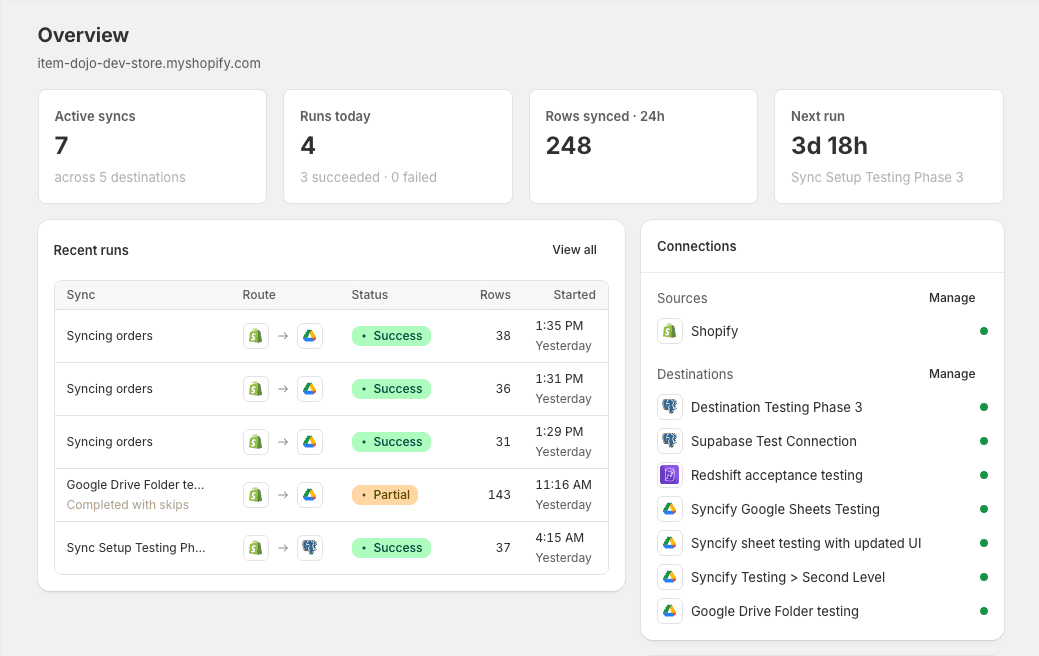
From weekly right down to every minute (plan-dependent), in your timezone, or on demand with one click. Incremental mode moves only what changed since the last run, and every run breaks down into per-entity tasks with row-level samples of exactly what was written.
Read-only access — beyond the core catalog, each entity’s permission is requested only when you enable it. Destination credentials are encrypted with AWS KMS, connections come from a static IP you can allowlist, and failures email you and retry automatically with backoff.
Questions, answered.
Can't find what you're after? — a human will reply.
What is Syncify?+
Syncify is a Shopify app that moves your store’s data into storage you own, on a schedule. Connect a destination — a database, warehouse, S3 bucket or Google Drive — choose the entities and fields you want, and Syncify extracts them from Shopify and loads them in automatically. Every run is visible in the app, down to per-entity tasks and sample rows written, so you always know what moved and when.
Which sources can Syncify pull from?+
Today Syncify syncs your Shopify store: 16 entity types including products, variants, customers, orders, draft orders, abandoned checkouts, inventory levels and items, collections, locations, gift cards, blogs, articles, pages and URL redirects, plus Companies on Shopify Plus. Xero and Jungle Commerce are next on the roadmap.
Where can Syncify send my data?+
Five destinations are supported today: PostgreSQL, MySQL and Amazon Redshift for direct database loads, Amazon S3 for CSV files, and Google Drive for CSV files or a live Google Sheet. Database destinations support upsert or insert modes, a custom table prefix, configurable batch sizes and automatic handling of schema changes.
How often does data sync?+
As often as your plan allows. Recurring schedules run weekly, daily, hourly, every 15 minutes, every 5 minutes or every minute: Standard plans schedule daily, Pro hourly, Enterprise every 15 minutes, and Custom plans go down to minute-level. Schedules are timezone-aware, and you can trigger a manual run any time with one click.
Can I transform data before it lands?+
You control exactly what lands. A visual field picker lets you tick the fields you want from each entity — or flip to the GraphQL view to see the query it builds — and each field maps to a clearly named destination column. Nested data is flattened automatically: lists like variants get their own linked tables keyed to the parent record. Incremental mode moves only records that changed since the last run.
Is my data secure?+
Syncify reads from Shopify with read-only permissions — beyond the core catalog (products, variants, collections), each entity’s permission is requested only when you enable that entity. Destination credentials are encrypted at rest with AWS KMS, database connections support SSL and come from a static IP address you can allowlist in your firewall, and we subscribe to Shopify’s mandatory GDPR webhooks. Your synced data’s home is storage you own — Syncify keeps only short-lived staging copies and the run samples shown in the app, and these expire from our storage automatically after 30 days.
How do I get started?+
Install Syncify from the Shopify App Store and your store connects as a source automatically. Add a destination and hit “Save & test” to verify the connection, then create your first sync: pick entities and fields, set a schedule, and press “Run now”. Your first rows land in minutes.
What does it cost?+
Plans are billed through Shopify: Standard at US$29/month (3 active syncs, daily schedules, 500K rows/month), Pro at US$59 (10 syncs, hourly, 1.5M rows) and Enterprise at US$89 (25 syncs, every 15 minutes, 5M rows). Need unlimited syncs or minute-level schedules? Talk to us about a Custom plan. Every tier includes a pooled monthly run allowance with flat per-run pricing beyond it.